.png)
 5 days ago
14
5 days ago
14
A power bank that charges your MacBook Pro at full speed and refills itself in under an hour. That is not marketing copy; that is what the Anker Prime Power Bank (20K, 220W) actually does.
The "Buy Nice or Buy Twice" Philosophy
If you have spent any time traveling for photography work (or just traveling), you have probably accumulated a graveyard of cheap power banks. They all share the same trajectory: promising capacity claims on the box, acceptable performance for the first few months, then a slow decline into unreliability right when you need them most. The battery that got you through an all-day shoot last year now struggles to top off your phone. The one you bought as a backup triggers "slow charger" warnings on your laptop. Eventually you throw them in a drawer and buy another $30 solution, repeating the cycle indefinitely.
The Anker Prime Power Bank (20K, 220W) represents the opposite approach. At $150 and over a pound of weight, it asks you to invest more upfront in exchange for something that actually solves the problem rather than temporarily masking it. Anker markets this as a "mobile power station," and after a month of daily use alongside my 16-inch MacBook Pro and iPhone 17 Pro Max, I think that description is accurate. It is a genuinely useful tool that earns its place in my daily kit.
Design and Build Quality: Density and Durability
Anker describes the form factor as "soda-can size," which is roughly accurate if you imagine a slightly squared-off can. The dimensions (1.73 by 1.99 by 5.79 inches) make it pocketable in a technical sense, though the 1.12-pound weight means you will definitely know it is there. In a camera bag or backpack, it disappears entirely. The trade-off between density and capacity is one you have to accept consciously, but for users who need to power a laptop in the field, there is simply no way around the physics. Lithium-polymer cells that store meaningful energy have meaningful mass (and LiPo also survives many more charge-recharge cycles, so it's nice to see it here). The build quality became apparent in an unplanned stress test early in my ownership when I accidentally dropped the Anker onto a hardwood floor from about three feet up. It landed corner-first with a sound that made me wince, and I picked it up expecting to find a cracked display or at least some cosmetic damage. There was no damage, there were no dents, nary a scratch. The unit is not hollow plastic with a thin shell over the cells. It feels like a solid brick of machined hardware, and apparently, it is built like one too. That kind of durability matters when you are throwing gear into bags, working in rough conditions, or simply living the clumsy reality of life.
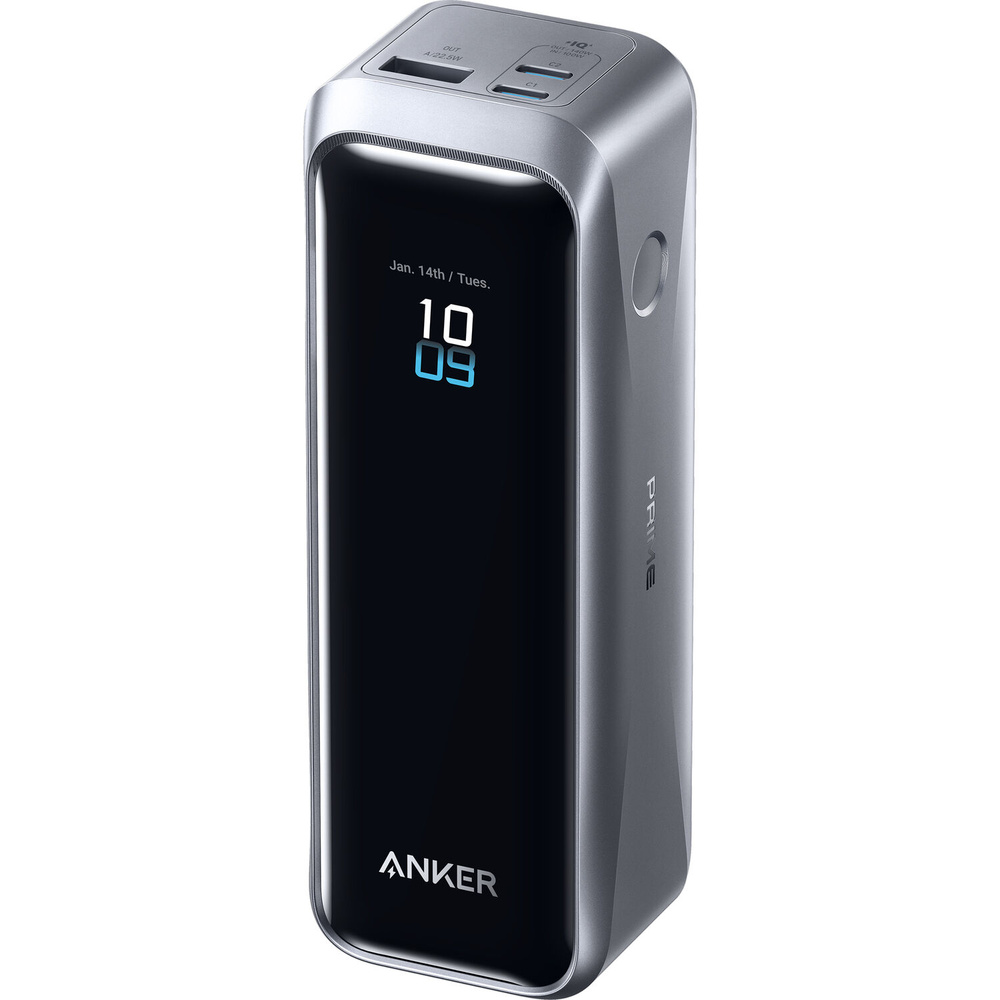 One minor usability note: Anker's marketing photography shows the unit standing upright on its narrow end, but I found myself preferring to lay it flat with the screen facing up. The standing orientation works on a stable desk, but the weight distribution makes it easy to tip over if you bump the cable. Flat orientation also makes the display easier to read at a glance, and the port layout (two USB-C and one USB-A across the top) works well in either position.
It's particularly nice having two USB-C and one USB-C output. That means you can power a camera shooting a time-lapse, charge your phone, and top off your laptop all at the same time rather than trying to schedule each before it dies.
Output Performance: Feeding the Power Hungry
My testing configuration consisted of the two devices that define my mobile workflow: a MacBook Pro 16-inch (M4 Pro) and an iPhone 17 Pro Max. The MacBook demands serious power, especially under load, and lesser power banks either trigger the "slow charger" warning or simply cannot keep up with consumption during intensive tasks. The Anker Prime delivered 140 W to the MacBook without complaint. No warnings, no throttling, no perceptible slowdown compared to wall power. During a recent rehearsal that typically drains my laptop completely, I ran the MacBook while simultaneously charging my phone from the second USB-C port, and the power bank handled both loads without drama. The 220 W total output figure is not just marketing; it reflects genuine capability for multi-device charging at useful speeds. Thermal management deserves specific mention because high-wattage output typically means heat buildup, but despite sustained high-output charging sessions, the unit stays remarkably cool. The ActiveShield 4.0 system that Anker advertises (temperature monitoring "10,000,000+ times per day") sounds like marketing hyperbole, but the practical result speaks for itself. After an hour of feeding my MacBook at full draw, the Anker was barely warm to the touch. I have used cheaper high-wattage chargers that get uncomfortably hot under similar conditions, so the thermal engineering here represents genuine progress rather than spec-sheet fiction.
The 20,100 mAh capacity (approximately 72 Wh) hits a useful sweet spot. It is large enough to meaningfully extend a 16-inch laptop's runtime by about 60% or fully charge an iPhone 17 Pro Max approximately four times, while remaining comfortably under the 100 Wh threshold that airlines require for carry-on batteries. You can take this through airport security without questions or special documentation.
Input Speed: The Underrated Game Changer
High-capacity power banks traditionally suffer from a fundamental usability problem: they take forever to recharge. You drain them during the day, plug them in overnight, and hope they are ready by morning. If you need a quick top-off between sessions, you are out of luck. The Anker Prime accepts 100 W input, which transforms the recharging experience entirely. On the other hand, I consistently achieved full recharge in approximately 45 to 50 minutes. The 50-percent mark comes even faster, around 25 minutes, which means a quick charge during lunch can restore meaningful capacity for an afternoon shoot. This speed changes the fundamental relationship between you and the battery. Instead of planning your day around charging limitations, you simply plug in when convenient and trust that usable capacity will return before you need it.
 The front display makes this process surprisingly satisfying. Rather than guessing whether the power bank is actually charging at full speed, you see real-time capacity and a "time to full" countdown updating live as power flows in. It's fun watching "27 minutes remaining" tick down while the percentage climbs from 34% to 35% to 36%, rather than staring at a slowly blinking LED and wondering if something is wrong. I found myself glancing at the screen more often than expected, just for the simple satisfaction of watching the numbers change in real time. Knowing exactly how much capacity I had and precisely when the charge would complete let me plan around the battery rather than guess. It removes the uncertainty that plagues most battery-charging experiences and replaces it with actual data.
Anker sells a separate $100 charging base that uses pogo pins for wireless-ish recharging at the same 100 W speed and also offers ports for simultaneous device charging. If you are building out a full Anker ecosystem on your desk or want a clean docking solution, it is a nice option to have.
The Smart Features: Screen Versus App
The integrated display is the feature I did not know I needed until I had it. It shows battery percentage, real-time power flow (both in and out), active ports, and charging time estimates. The screen wakes automatically when you move the unit, and the brightness is plenty for outdoor visibility. After years of power banks with four LEDs that vaguely indicate charge level, having actual numbers feels like a revelation. The Anker app connects via Bluetooth and offers additional controls including screen timeout settings, screensaver customization, detailed power statistics, and charging mode selection. I spent about 20 minutes exploring it during my first week of ownership, adjusted the screen timeout to my preference, and have not opened it since. The app is well-designed and functional, but the on-device display already provides everything you need for daily use, so consider the app a nice backup for occasional tweaks rather than a core part of the experience.
What I Liked
- The 140 W single-port output handles a MacBook Pro 16-inch without compromise.
- The 100 W input means full recharge in under an hour, fundamentally changing how you plan around the battery.
- Build quality survived an unplanned drop test onto hardwood with zero damage.
- The display shows actual wattage, capacity percentage, and time remaining in real time.
- At 72 Wh, the capacity is large enough to be useful while staying under airline limits.
What I Didn't Like
- Nothing, it's a well-made and well-designed product.
Conclusion
The Anker Prime Power Bank (20K, 220W) solves battery anxiety not just through raw capacity, but through input speeds fast enough to keep pace with a working photographer's workflow. You can drain it during a morning shoot, recharge it over lunch, and head back out with full confidence. The build quality suggests this will outlast the cheaper alternatives by years, and the integrated display transforms charging from a guessing game into a precise, plannable process. If you have ever felt let down by a power bank that could not keep up with your laptop or took all night to recharge, this is the upgrade that finally closes that gap. It is heavy and it is expensive, but it works exactly as advertised, and that reliability is worth the investment.






 English (US) ·