.png)
 6 days ago
15
6 days ago
15
If you’re looking at picking up a drone, you probably are thinking of one made by DJI, or another DJI, or yet a third DJI option. Others have tried, but largely, all have failed to get a solid foothold. However, this only refers to the drone market that appeals to the creative videographers. When it comes to the first-person view (or FPV) market, there are many brands vying for attention.
These tiny drones are all about fun and acrobatics, while providing the user with an exhilarating piloting experience. Now the Antigravity company, which was incubated inside of Insta360 and therefore leverages its camera technology, is trying to bridge the gap between exciting FPV controls and creative video capabilities to appeal to a broader audience.
We got our hands on the new sub-250-gram A1 drone to see if Antigravity has succeeded — especially when you consider the very high $1,600 price.
 The A1 drone is simple and easy to fly, and sits under the 249-gram limit with standard batteries.
Antigravity A1 Drone Review: How It Feels
The user experience is very different from any traditional drone that I’ve tested. There is no dual-joystick remote control with the kit, but rather a VR headset and single joystick controller, which is more akin to a video game controller — think a Wii remote.
This control scheme is more common for FPV drones, but still unusual, and the included VR goggles certainly immerse the viewer in the experience, but the fact that this drone uses a 360-degree camera interface changes the ride completely.
The goggles use a 2560 x 2560 pixel display, which provides a fairly sharp viewpoint with a square ratio. You navigate the menu by using the joystick to point the cursor as almost any other VR game interface would employ. There is a wide range of eye-width and diopter adjustments available, and the headset did not pinch or become uncomfortable for the duration of my flights.
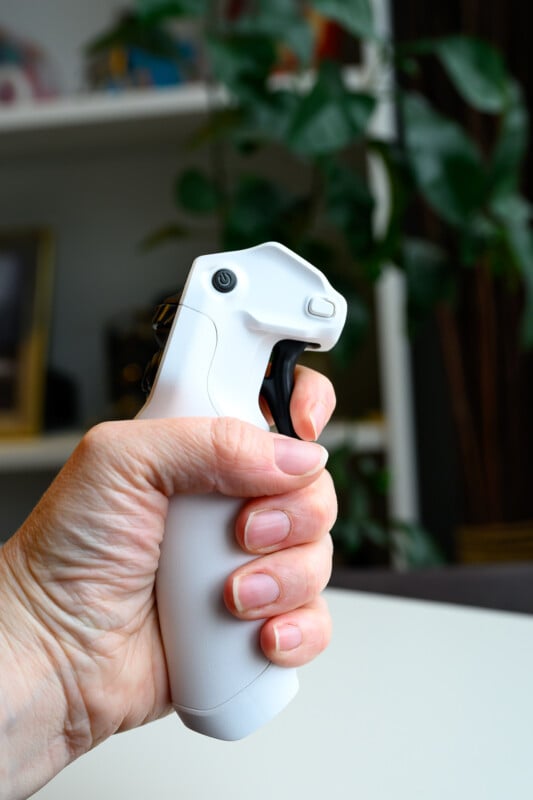 The joystick is small, light, and easy to use.
 The controls are well designed, but it will take a bit of practice to learn them without lifting the goggles.
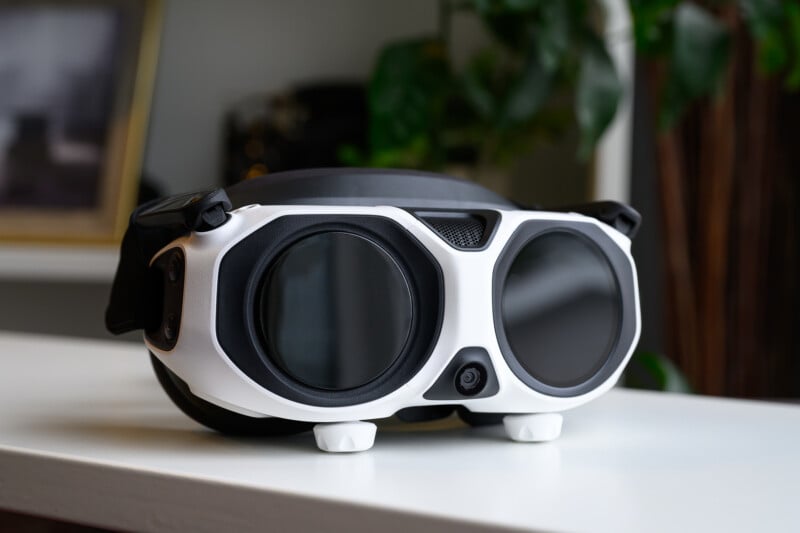 The goggles are comfortable for most users, and not very heavy.
There is a button on the side of the goggles that gives you a black and white pass-through feed so that you can see what you’re doing with your hands and what is around you in your vicinity. Most of the time, however, I would pull the goggles up to get reacquainted with my surroundings. This is made slightly more inconvenient, though, by the power pack for the goggles being located on a neck lanyard, and a fairly tight one at that. The power cable is also quite short, which means you can’t pocket the battery pack. The power cable is proprietary, so a longer version is not currently available.
There is also a display monitor on the front of the goggles so that spectators can watch the view too, but it is so small as to be unusable, and the user is often whipping their head around from side to side anyway. This function could have been omitted to save cost.
 There is a display monitor on the front, but it is basically pointless, and there is no video-out feed to speak of.
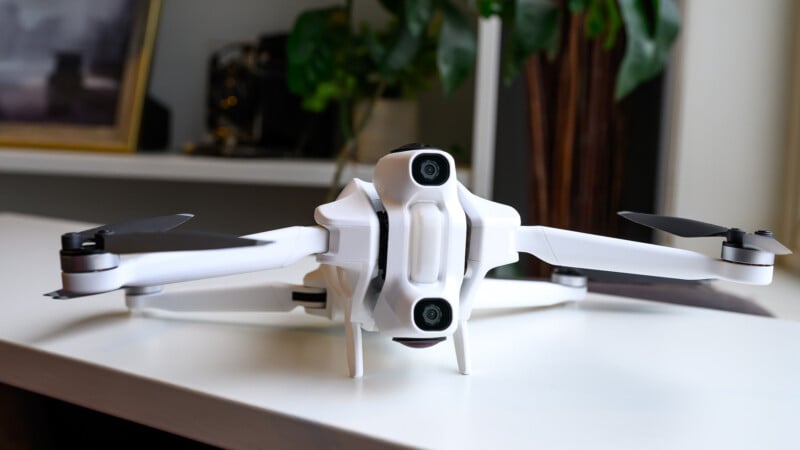 The A1 has excellent collision avoidance technology, but it might be a little too safe for more dynamic shots.
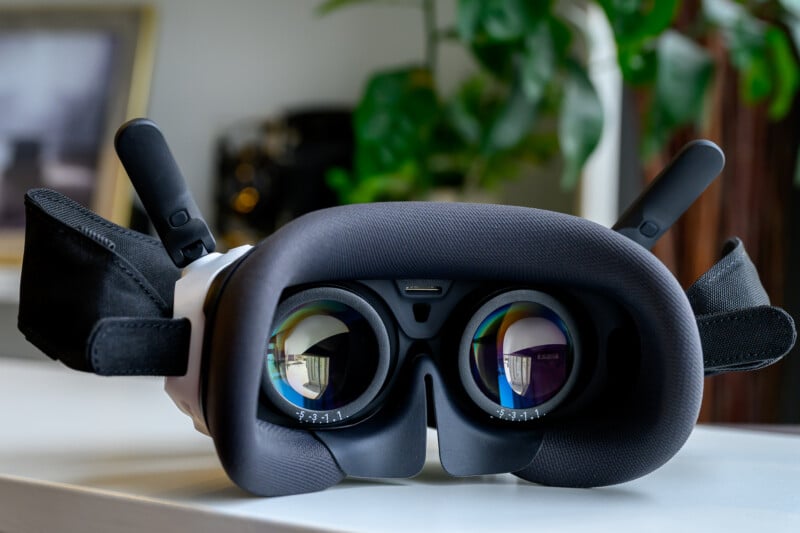 There is plenty of adjustment for different people’s specific visual requirements.
The motion controller is compact and easy to use, with a couple of customizable buttons, a yaw control wheel, and a trigger that acts as the accelerator for the drone. There is also a three-way speed selector and buttons to start recordings and bring up the menu.
Antigravity also included a red brake button, which will freeze the drone in place and can also be used to bring the drone home automatically.
Flying the drone is made quite simple with this controller, where it acts much like the joystick in an airplane to control direction and make turns. Absolute beginners will find the A1 drone quite simple to fly with minimal time invested, as the drone is effectively a point-and-fly affair.
Simply aim the diamond reticle where you want to go and pull the trigger, and the drone follows smoothly and calmly to its target. Quick direction changes can be made with the yaw wheel, and there is both a slower cinematic speed to fly with or a normal speed to fly with that still offers collision avoidance. It’s important to note that the A1 is all about smooth and easy flying, and it does not offer any sort of acrobatic control or tight turning capabilities normally associated with FPV drones.
 The heads-up display worked great, and the visual quality for piloting the drone was adequate.
 The object avoidance does its job well, but you can go to sport mode when you want to do riskier flying.
 The potential for bird’s eye viewing is spectacular, and will be one of the biggest selling points for the A1 user.
There is also a sport mode, which unlocks the fastest flying and turns off collision avoidance altogether. I found myself using this mode the most because the collision avoidance systems are overly cautious, often stopping the drone from flying within multiple meters of objects rather than multiple feet. This makes sense for the beginner to avoid any trouble, but I wanted to utilize the 360-degree cameras to their fullest by flying through structures or skirting close to the deck.
Unfortunately, this did result in a couple of crashes, mostly because the A1 has enough speed to get you into trouble but not enough turning responsiveness to get you out of it. Luckily, the prop guards that we attached did a great job of protecting the drone, so despite crashing multiple times, the A1 avoided any real damage.
The camera lenses are quite exposed, but Antigravity wisely allows you to change any scratched lenses yourself.
Antigravity A1 Drone Review: How It Flies
In the Free Mode flying style, the drone will respond to altitude adjustments with the joystick and will follow the VR headset for direction adjustments. Basically, turn your body or head to the left, and the drone will go left, for example. Beginners usually find this mode easy to use, and it lets you get your bearings before committing to forward movement. It can also look a little silly as you stand out in a space, constantly rotating around on the spot. Obviously, it wouldn’t work well if you were seated or in a more confined space.
However, you can also fly it in FPV mode, which I found to be far more enjoyable. In this mode, you use the controller like an airplane joystick, pushing forward and back to control pitch and left and right to control roll. The diamond reticle is still there, which essentially guides the drone, but you get an artificial horizon to steer with, and because of the 360-degree camera, I can freely look anywhere while the drone flies in any direction, exactly as if I were flying an airplane. This truly gives the user a bird’s eye view of the world, and for my money, is the most enjoyable and valuable part of this whole experience.
Battery life is about 24 minutes with the higher capacity batteries, as long as the conditions are calm. There is a pro kit option that gives you three batteries and the prop guards to shield the drone, which we recommend (given the number of times those prop guards paid off). I found the battery life to be true to its claims, although the A1 is very conservative when it comes to warnings about running out of battery life, which all makes sense given its more casual target audience. There are lots of ways to customize how these warnings work and how much you want the drone to babysit you, though, and I found it easy to do manual returns to home and landings without assistance.
 The battery life is adequate but you’ll want extras.
The A1 will top out at about 24 mph, which is fairly swift and handled a bit of wind without any issue. The heads-up display works well to give all the essential information, like altitude, distance from home base, speed, and camera settings. What I found most remarkable about the A1 experience was just how polished it was. The menu has lots of options and settings, and the info is all clearly laid out. The drone itself flies with minimal effort or education and is intuitive to use. It is clear that the target audience is of a more casual nature, and therefore, experienced FPV pilots will likely want to look elsewhere.
But the A1 absolutely gives the novice user a fun and casual experience with a drone while providing an unprecedented amount of freedom to view the world around them. The drone itself is never in view either, so the experience really feels like your mind is flying through the air, although there is an option to place an artificial cockpit, or dragon even, underneath your view, which some people might prefer. It’s hard to get into trouble with the A1 drone, but the experience could get a little pedestrian after a while. However, this drone could also be a perfect gateway to more advanced FPV drones for the burgeoning pilots out there.
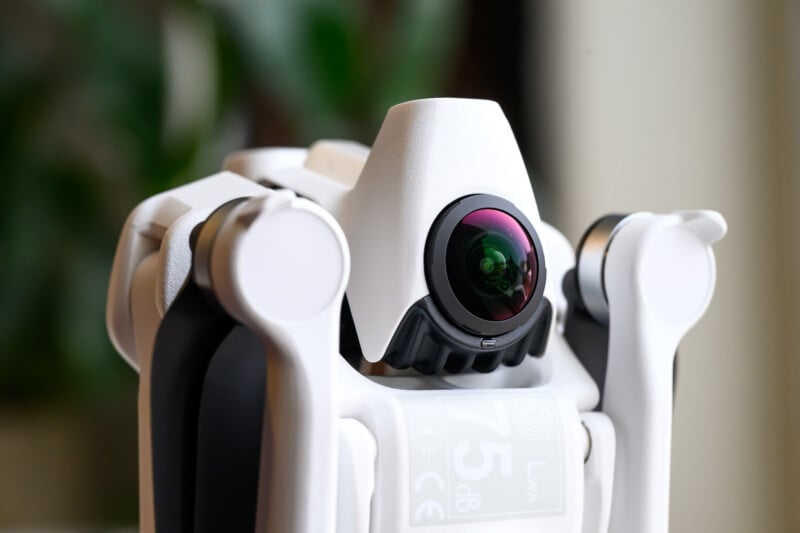 The lenses for the 360 camera can be changed if they get damaged.
 The A1 drone is neither an acrobatic FPV drone or a high-end video camera, but it does combine the two worlds in a unique way.
The Antigravity A1 Is Fun, But Expensive
Let’s get this out of the way. The A1 drone is a very expensive kit. The full kit with extra batteries, which are, in most cases, essential to have, is going to cost you $2,000. That makes the A1 a very expensive toy, since the footage isn’t on par with a comparable DJI drone, and the product overall is meant to just provide a pilot with the sense of flying — ie, it’s mainly for fun.
Part of that cost goes into the 360-degree camera, which is effectively the same as the Intsa360 X5. The 8K resolution is decent, but when you crop it to a standard frame, it is going to be far closer to 4K footage, and if you zoom in at all, the quality falls off quickly. This means you want to fly the drone as close to things as possible to maintain image quality in a tighter frame, and it also means that mixing this drone footage with other standard camera footage will be tricky. I love that you can pull multiple angles and frames from a single flight with a 360-degree camera drone, which provides a lot more potential footage than a standard drone. You can also take photos, although they are limited to about 55 megapixels of resolution.
 The resolution isn’t as impressive when cropping to a standard video frame.
 A more affordable DJI drone will be better for video quality.
There are some very dynamic visual applications that can be achieved with a 360-degree camera attached to a flying drone, so don’t get me wrong. In fact, even though the drone can’t do acrobatic movements like more capable drones can, the fact that the footage is from a 360 camera means that acrobatic flips and fast whips can all be achieved in post. However, a DJI drone at a similar or even far more affordable price will perform way better in a fixed 16:9 frame.
The A1 video quality still comes off as a more casual use case or as a vector to give users a 360-degree view while flying, and that is where the fun lies. The A1 is ideal for creative videographers who want dynamic footage for less demanding use cases like social media, or for everyday folks who want a unique visual experience tied to an easy-to-fly drone.
 You have to use the Insta360 editing app to prepare your final footage.
The Antigravity A1 is remarkably well-designed with a polished interface, and it represents a drone experience that we haven’t seen before. However, the high cost is going to be prohibitive to almost all prospective buyers. If it does nothing else, it proves that the mating of a 360-degree camera to a drone is a brilliant experiment with lots of potential going forward.
Are There Alternatives?
No, there really is nothing quite like it on the market. The A1 is unique in its blending of a 360 camera with a safe and stable drone.
Should You Buy It?
Maybe. Everything that the A1 claims to deliver, it does incredibly well. You only have to manage expectations about the video quality and the lack of affordability.





 English (US) ·